The QR menu for food trucks that loads in the line

About 7 KB before photos, so it opens fast on one bar of signal. Change prices from your phone between rushes.

  • Street
  • Bold
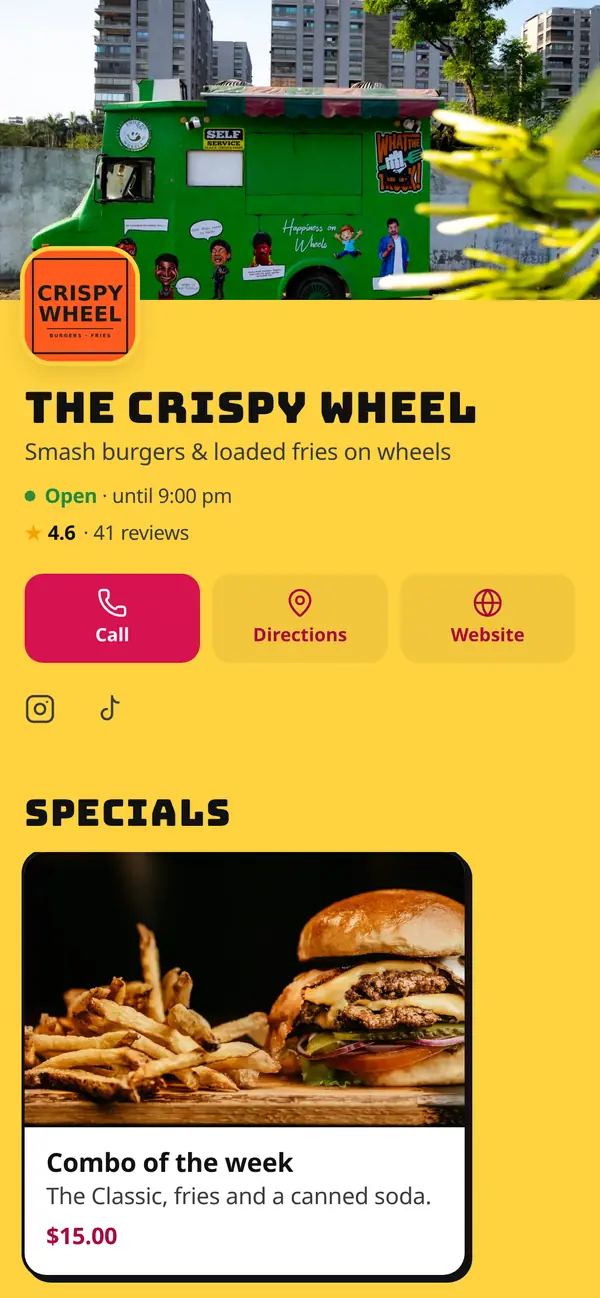
The Crispy Wheel: Smash burgers & loaded fries on wheels
The Crispy Wheel · Street

Food truck lines are crowded, outdoors and often on bad reception. A PDF menu stalls; spotmymenu opens right away. Put one QR code on the window, the side panel and your Instagram bio. When you park somewhere new, update your hours and the menu from your phone.

  • Built for weak signal

    Tiny pages and smart photos that load only as guests scroll.

  • Read the menu while waiting

    Guests decide in line, so orders at the window are faster.

  • Live hours

    “Open now / Closed” updates automatically from your opening hours.

  • Social in seconds

    Turn today's special into an Instagram story right from your phone.

Food trucks · Menu examples

Menus with their own personality

Same platform, completely different menus. Pick a restaurant to see its theme, colors and the design choices behind it.

2 examples · 1 theme · 2 color schemes

The Crispy Wheel, Street theme

The Crispy Wheel

“Smash burgers & loaded fries on wheels”

Theme
Street
Layout
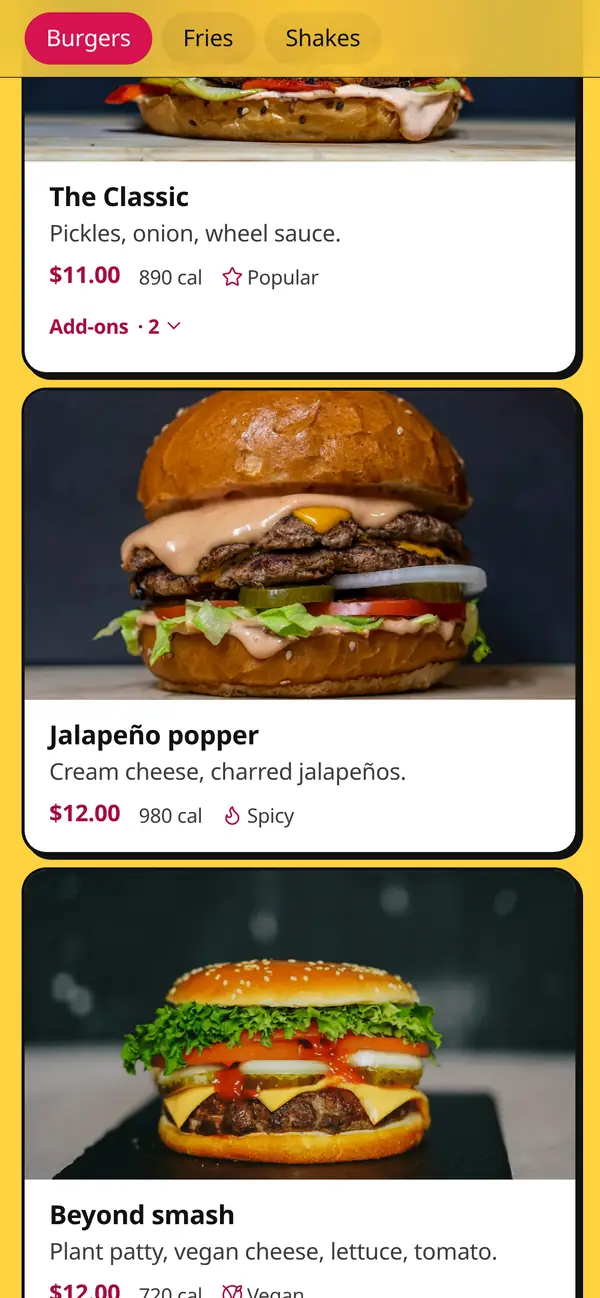
Photo cards: big photos that sell
Accent
Theme default

Why it works

  • Three short sections (Burgers · Fries · Shakes), so people decide before they reach the window.
  • Every item has a big photo. In a line, pictures sell faster than words.
  • Combo of the week keeps regulars coming back to see what's new.

Themes aren't tied to a cuisine

Copper Kettle Brewing runs on the BBQ Smokehouse theme. Morning Ritual Café uses the fine-dining Ivory theme. Hickory Hollow smokes brisket on Modern. Pick the look that fits your concept, then make it yours with an accent color.

Example restaurants are fictional. The menus are real spotmymenu menus.

Best practices

Menu design tips for food trucks

  1. 01

    Three sections, short lists

    Mains, sides, drinks. Four to six items each. Guests should decide before they reach the window.

  2. 02

    A photo for everything

    In a line, pictures sell faster than descriptions. Card layouts put a big photo on every item.

  3. 03

    Keep your hours live

    When you move or sell out early, update the hours from your phone. “Open now” does the rest.

  4. 04

    Print a big QR on the truck

    Guests scan from the line, so size the code for distance: roughly 10 cm wide for every metre away.

  5. 05

    Make “of the day” a habit

    Combo of the week, catch of the day. Followers check your menu to see what's new.

  6. 06

    Share specials where your fans are

    Turn today's special into an Instagram story from your phone with the social post builder.

A menu structure that works

Start here and adapt. Short sections with clear names make the sticky section bar easy to use.

  1. 1Mains
  2. 2Sides & extras
  3. 3Drinks

Specials ideas

Put these at the top of your menu and schedule them to appear on the right days.

  • Combo of the week
  • Catch of the day
  • Event menu
  • Late-night special
  • Lunch rush combo

FAQ

Will the menu load with bad reception?

Yes. A full menu is about 7 KB before photos, far smaller than a PDF, and photos load only as guests scroll.

Can I use one QR code everywhere?

Yes. The same code works on the truck, flyers, receipts and social media, and it never changes when you edit the menu.

Can I post specials to Instagram?

Yes. The social post builder turns a special into a square post, portrait post or story in your menu's theme.

Your new menu could be live tonight.

7 days free. Set up in minutes. Cancel anytime.

Start your free trial

7 days free · then $8.99/mo

Start free